Managing load board posting with multiple load board integrations
If your company has integrated multiple load boards, such as Central Dispatch and Super Dispatch, with BATS, you will be able to post and unpost Orders from those load boards in one space.
To post an Order, click on "Post to Load Board" button on the order page, you will see a dialog box like this one:
All linked load boards will be checked by default. If you don't want to post to a load board, simply uncheck the box next to its name. Click "Post" button and BATS will post the order to all selected load boards.
After successful posting you will see a section on the Order page like this one:
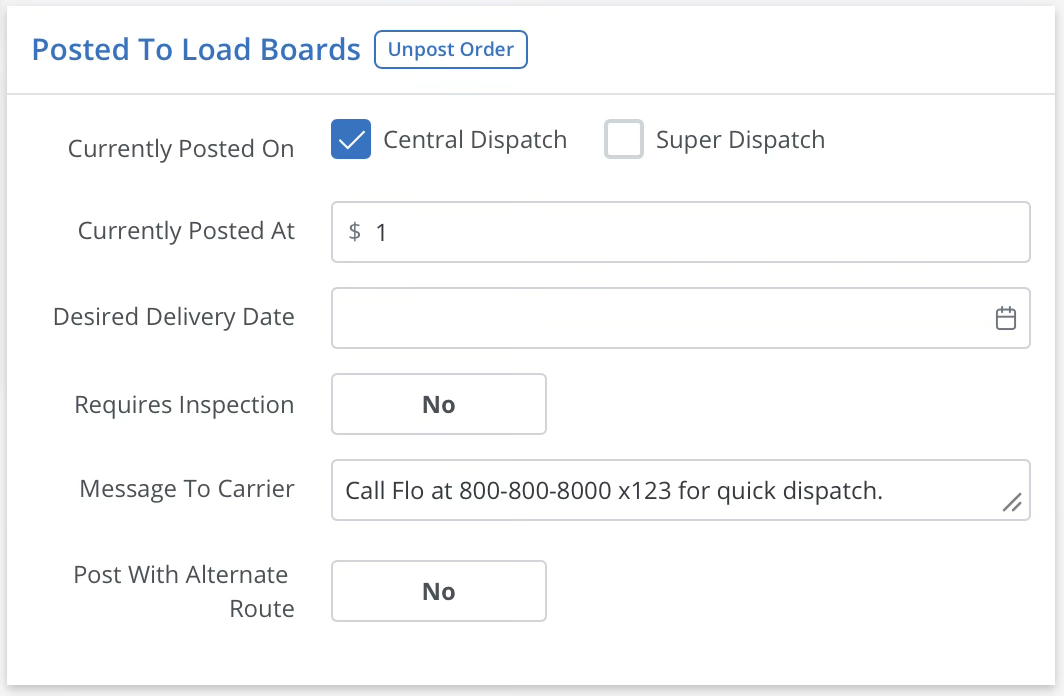
All load boards that have a check mark have been successfully posted. If you wish to unpost an order form one load board, simply uncheck the box next to its name and click "Save" button.
To update a listing, simply make changes to the Order and click "Save" button, BATS will automatically update the listing on all load boards where it is posted.
To unpost the Order from all load boards click on “Unpost Order” button.
To post the Order on a load board where its not yet posted, check the checkbox next to the load board name and click “Save” button.